Refining Search Results
Apply generic constraints to the results grid to reduce the volume of rows displayed.
Create both simple and complex filters using the Custom Filters dialog box to further refine the rows displayed in the results grid.
Once the display is refined, click the desired rows to retrieve the associated data. This winnowing and selection process is the quickest way to narrow results. You can however select individual rows from an unfiltered search results grid.
General Search Constraints
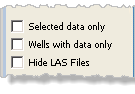
The general curve constraints and filters that apply to all data tabs (Digital Log, Raster Log, and Well Files) are at the top of the left pane and include the following:
|
Selected data only | Display only selected curves. |
|---|---|---|
| Wells with data only | Display only wells that contain data. | |
| Tab Specific Options | Digital Logs: Geophysical curves only. Well Files: Hide LAS files |
Digital Log Search Constraints
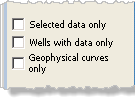
The digital log constraints and filters are located on the left side of the LOGarc window. They are used to limit the curve data displayed in the search results grid. The list below includes a description for each digital log curve constraint.
|
Geophysical curves only | Displays only curves associated to Curve Group: Gamma Ray, Bulk Density and Sonic . |
|---|---|---|

|
Run Types Only | MP—Main Pass; TVD—True Vertical Depth RPT—Repeat Pass; HRES—Hi Resolution |
Raster Log Search Constraints
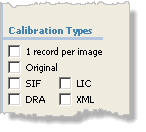
The digital log constraints and filters are located on the left side of the LOGarc window. They are used to limit the curve data displayed in the search results grid. The list below includes a description for each digital log curve constraint.
|
Calibration Types | Displays only raster logs with the specified type(s) of calibration files: SIF, DRA, LIC, and XML. Additional options include displaying only logs with 1 record per image, and displaying only the Original calibration file. |
|---|
 Related Topics

IHS Markit™